Complaint management for Military Engineer Services.
A military engineer services complaint management system in daily use: the Pakistan Army's Military Engineer Services (MES) replaced paper registers with SMART CMS, built by Eziline Software House. Every complaint is logged and tracked, every skilled man is managed, and CMES, ACE and the Garrison Engineers get their daily workload on WhatsApp.
Complaint management systemGarrison engineer complaint trackingSkilled man (skillman) managementWhatsApp reportsEnglish and Urdu assistant
4Corps use it for daily complaints: 1, 2, 10 and 11
4Priorities: Immediate, Urgent, Routine, Differed
2Languages on the citizen WhatsApp assistant
1Nightly WhatsApp workload report to CMES, ACE and GEs
Client
Pakistan Army, Military Engineer Services (MES)
Used by
11 Corps, 10 Corps, 1 Corps and 2 Corps, at all their stations
Before
Complaints on paper registers; reports unmanaged
Solution
SMART CMS (smartcms.pk): complaints, skillmen, stores, reports and WhatsApp
Reports go to
CMES, ACE and the Garrison Engineers (GEs), every night on WhatsApp
Delivered by
Eziline Software House, Islamabad
The challenge
A register records a complaint. It does not manage one.
MES is the engineering and construction organisation behind the Pakistan Armed Forces, headquartered in Rawalpindi. Across its stations, buildings and services generate a steady flow of maintenance complaints, and each one needs a skilled man, a deadline and a record that it was fixed.
Paper registers
Complaints were written into registers. A register shows that a complaint was received. It cannot assign the work, time it, remind anyone or add the numbers up.
Unmanaged reports
Reports were unmanaged, so the officers responsible for the workload, from the Garrison Engineer at a station to the senior engineers above, had no dependable daily picture of what was open.
Skilled men without a record
The tradesmen who do the repairs (skillmen) have trades, supervisors, attendance and a work history. That had to be managed alongside the complaints they are sent to.
One control room
Four Corps, every station, one system.
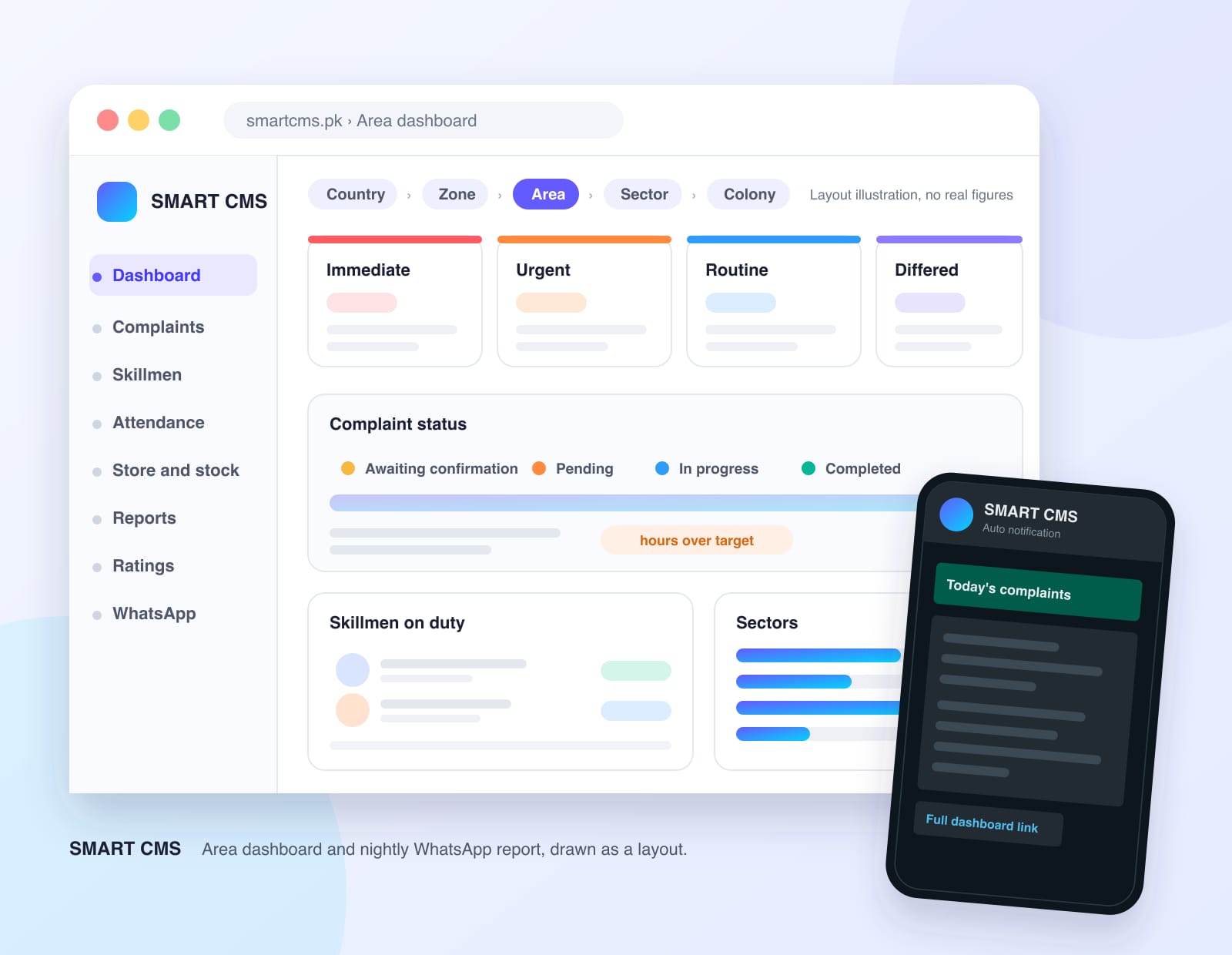
SMART CMS follows the way the work is organised. The country holds zones, each zone holds areas (stations), each area holds sectors and each sector holds colonies. 11 Corps, 10 Corps, 1 Corps and 2 Corps run their daily complaints on this one structure, so a Garrison Engineer sees their own station and senior officers see the layers above it.
The four Corps
1 Corps · 2 Corps · 10 Corps · 11 Corps
Structure inside each Corps
Area stations · Sectors · Colonies
What SMART CMS covers
Complaints, skilled men, stores and reports in one system.
It is a complaint management system first, and it carries everything a complaint needs to get closed: the people, the stock, the follow-up and the reporting.
Hierarchy from country to colony
Country, zone, area, sector and colony, with buildings, floors and homes below. Each role is tied to its place in the structure and sees only that part of the data.
ZonesStationsSectorsColonies
Complaint intake and logging
Complaints are raised by staff on the web, through a facilitation centre, from the mobile app or over WhatsApp. Each gets a complaint number, a category and sub-category, an optional before photo and a printable record.
Web and appFacilitation centreComplaint number
Priorities and target hours
Immediate, Urgent, Routine or Differed. The first three carry target hours that are set per area. Differed complaints record a reason and carry no clock.
ImmediateUrgentRoutineDiffered
Status and assignment
Awaiting confirmation, pending, in progress and completed. A pending complaint is assigned to a skillman, who can be changed later, and the history of who worked on it is kept.
Awaiting confirmationPendingIn progressCompleted
Skilled man (skillman) management
Skillmen with their trades, designations and supervisors, bulk import from sheets, attendance upload, and work time per complaint. Supervisors are tied to trades and colonies.
TradesAttendanceSupervisorsBulk import
WhatsApp complaint assistant
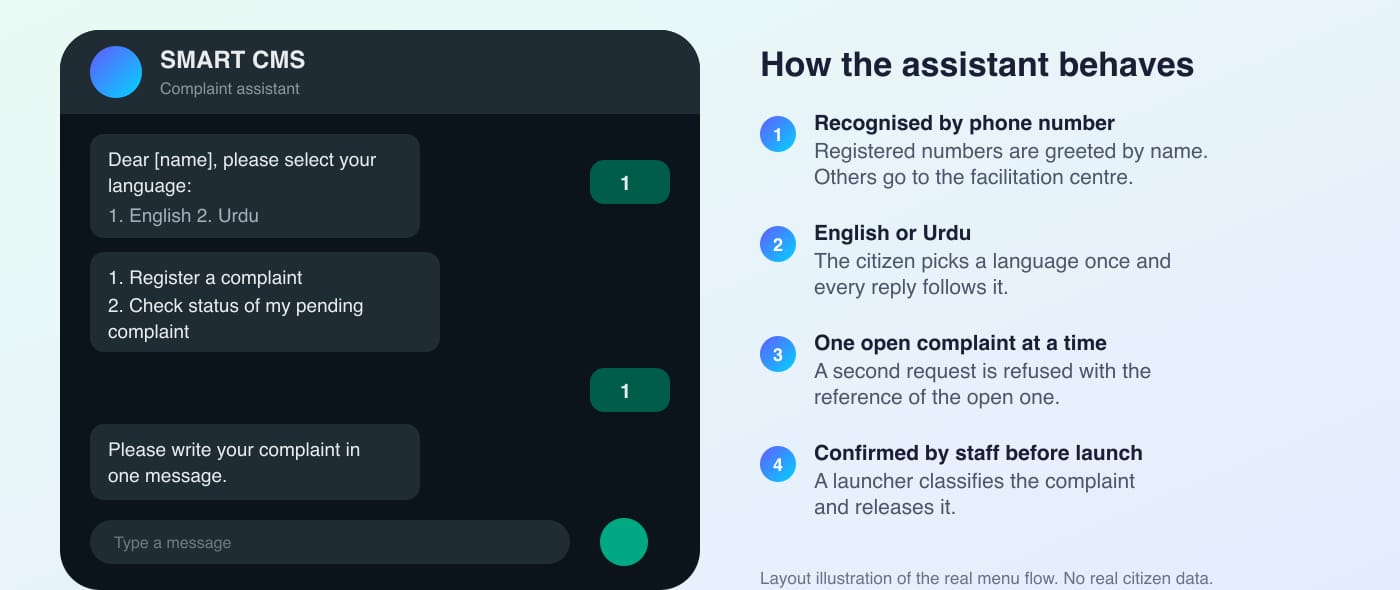
Residents message a number, pick English or Urdu, register a complaint or check its status. One open complaint per citizen keeps duplicates out. Staff confirm and classify before launch.
English and UrduOne open complaintStatus check
Nightly WhatsApp workload reports
Every night each area report goes to its nominated recipients and each zone report to its own: today's counts, priorities, delayed complaints and a link to the full dashboard.
Area reportZone reportDashboard link
Dashboards and graphs
Dashboards at country, zone, area, sector and colony level, with trends, delay bands, a per-sector breakdown, resolution time, ratings and skillman attendance. Graphs by category, month and area.
Per-sector viewDelay bandsTrends
Stores, stock and suppliers
Stores per sector, items and brands, suppliers, stock requests, assignment and transfers. Stock issued against a complaint is recorded, and the day's top-used items appear in the report.
StoresRequestsTransfersSuppliers
Follow-ups, ratings and feedback
A personal follow-up list lets each officer keep the complaints they are chasing in one place. When work is done, the citizen is asked on WhatsApp to rate it from 1 to 5, and the rating is needed to close the complaint. Rating reports show how the work is rated.
Follow-upsRatingsFeedback
Reports, exports and permissions
Daily, category, skillman, summary, store and rating reports with print and Excel/CSV exports. Roles and permissions decide who sees what, and super-admin controls switch the WhatsApp assistant and nightly report on or off for a zone or a single area.
Excel exportRolesPermissionsWhatsApp controls
A complaint's life
From raised to rated, on one record.
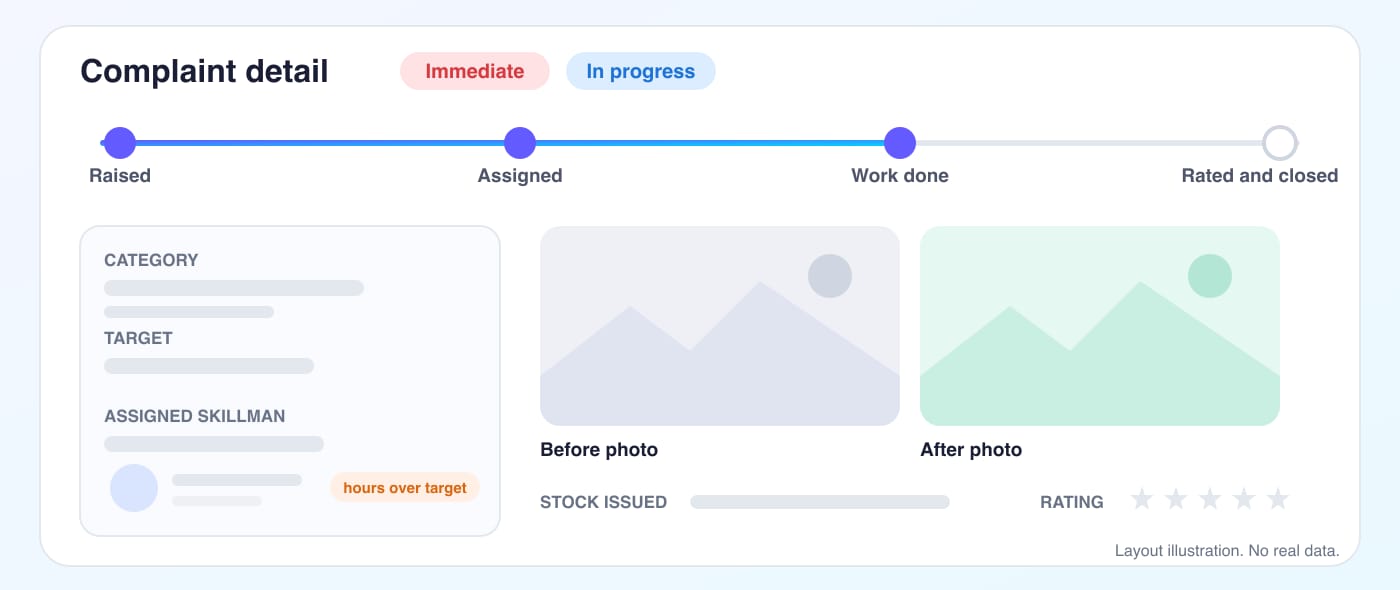
Follow one complaint through the system. Every step is stamped, so the times behind the reports come from the work itself.
Raise
Logged by staff, the facilitation centre, the mobile app or WhatsApp.
Confirm
WhatsApp complaints wait for staff to categorise and set a priority.
Assign
A skillman is assigned, the clock starts and the citizen is told.
Repair
Work is completed with before and after photos and any stock issued.
Rate
The citizen rates the work from 1 to 5 to close the complaint.
Report
Counts roll into the dashboards and the nightly WhatsApp reports.
Target hours
Every priority has its own clock.
Each complaint is Immediate, Urgent, Routine or Differed. The first three carry target hours. The clock starts when a skillman is assigned, and a complaint that runs past its target is shown as hours over target on the area dashboard and in the nightly WhatsApp report. Differed work has no clock, but its reason is recorded.
Illustration of how target hours work. Bar lengths are not real data.
Daily visibility
CMES, ACE and the GEs get the day on WhatsApp.
Every night the system sends the area report to the people nominated for that station, and a zone report to the zone's recipients: the zone total first, then one message per station. Each report ends with a link to the full dashboard, so the summary leads straight to the detail.
SMART CMS · Auto notification
Today's complaint statistics for your station
Total · un-assigned · in progress · completed
Immediate · urgent · routine · differed
Top categories for the day
Top delayed complaints · hours over target
Stock issued today
Full dashboard · sector breakdown and trends
Layout of the nightly message. Figures are left out.
Inside the screens
Two of the flows, drawn as layouts.
These are layout illustrations of real flows. They show structure only: no complaint, citizen or personnel data appears.
The WhatsApp complaint assistantLayout illustration by EzilineA complaint from raised to rated and closedLayout illustration by Eziline
What changed
From paper registers to a managed workload.
A record, not a register
Complaints are logged, categorised, assigned and tracked in SMART CMS instead of being written in paper registers.
Skilled men under management
Every skillman, with trade, attendance, supervisor and work history, is managed in the same system as the complaints.
Reports that arrive on their own
Unmanaged reporting is replaced by dashboards, exports and a nightly WhatsApp report that nobody has to request.
Four Corps on one system
1, 2, 10 and 11 Corps use it for daily complaint logging and resolution at all their stations.
According to the project owner, CMES, ACE and the Garrison Engineers receive their daily workload notification on WhatsApp and are happy to use it.
In plain words
Complaint management software for army and government departments in Pakistan
A department that maintains buildings and services lives on complaints: something is reported, someone is sent, the work is done and someone checks it. A complaint management system turns that chain into a record with a clock. For Military Engineer Services that means every complaint has a number, a priority, target hours, an assigned skilled man and a status, and the same data feeds the dashboards that senior officers read.
SMART CMS shows what that looks like in practice for a Pakistan Army organisation. It handles complaint logging and resolution, skilled man (skillman) management with trades, supervisors and attendance, stores and stock, ratings, reports and exports, and WhatsApp. Garrison Engineers get a nightly workload report with delayed complaints in hours over target, and citizens can register or check a complaint in English or Urdu on WhatsApp. The same model suits any government department, housing authority, hospital or facilities team with field staff and many sites.
Eziline builds complaint management software, WhatsApp notification systems and custom ERP in Pakistan. We configure the hierarchy, complaint categories, priorities and target hours to your organisation, set up the roles and reports each level needs, and support the system after go-live.
Military engineer services complaint management systemMES complaint management software PakistanGarrison engineer complaint trackingWhatsApp complaint management systemSkilled man (skillman) management softwareComplaint management system for army departmentsComplaint management system for government departments PakistanMaintenance complaint softwareComplaint tracking and resolutionDaily WhatsApp workload reportUrdu and English complaint botStores and stock for maintenance teams
Questions
Military Engineer Services (MES) · SMART CMS: frequently asked questions.
What is SMART CMS?
SMART CMS (smartcms.pk) is a web and mobile complaint management system built by Eziline Software House. It logs complaints, assigns them to skilled men, tracks status against target hours, manages stores and stock, collects ratings and produces dashboards, exports and WhatsApp reports.
Which MES formations use it?
According to the project owner, 11 Corps, 10 Corps, 1 Corps and 2 Corps of the Pakistan Army use SMART CMS at all their stations for daily complaint logging and resolution.
How does it replace paper registers?
Each complaint is entered once and gets a complaint number, a category, a priority and a status. It is assigned to a skillman and followed until the citizen rates the work. The register becomes a searchable record that can be counted, printed and exported.
Can residents log complaints on WhatsApp?
Yes. Registered residents message the number, choose English or Urdu, and register a complaint or check the status of their open one. The assistant allows one open complaint at a time, and staff confirm and classify each complaint before it is launched.
What is in the daily WhatsApp report?
Each night the system sends the day's complaint counts for a station, the split by priority, the top categories, the most delayed complaints in hours over target and stock issued, with a link to the full dashboard. Zone recipients receive the zone total and one message per station.
How are skilled men (skillmen) managed?
Skillmen are registered with their trades and designations and tied to supervisors, with attendance and bulk import from sheets. Each assignment keeps its work time, so complaints, attendance and ratings can be read for every skilled man.
Can the system be turned on or off by zone or area?
Yes. Super-admin controls switch the WhatsApp assistant and the nightly report for a zone, which covers every area under it, or for one area alone. A zone that was never configured keeps working.
Can Eziline build something similar for our department?
Yes. We set up your hierarchy, complaint categories, priorities, target hours, roles and reports, and add WhatsApp notifications for your officers. Book a free consultation and we will scope your version.
Your turn
Need a system like this for your organisation?
Tell us how your teams work today. We will show you the closest running system, then scope and quote yours with your workflows, roles and reports.